How to Create AgriStack Farmer ID Online: Easy Step-by-Step Registration Guide(2026)
The digital revolution in India’s agricultural sector has taken a giant leap forward with the rollout of AgriStack Farmer ID (Digital Public Infrastructure for Agriculture). Under this flagship initiative by the Central Government in collaboration with state agriculture and land revenue departments, every farmer is being assigned a verified digital identity known as the AgriStack Farmer ID (or Digital Farmer Registry ID).
If you are a farmer looking to secure government agricultural benefits without bureaucratic delays or middlemen, creating your Farmer ID is now an essential priority. In West Bengal and several other states, the online registration portal is fully active, allowing landowners to register, map their agricultural land parcels, e-sign via Aadhaar, and download their digital Farmer ID card from the comfort of their home or through a CSC center.
Below is an exhaustive, step-by-step walkthrough covering the entire real-time application procedure, necessary documents, land record fetching, social registry mapping, and status tracking.
What is AgriStack Farmer ID and the Digital Farmer ID?
The AgriStack Farmer ID is a unique, centralized digital identity designed to connect three critical pillars of a farmer’s profile:
- Aadhaar Demographic Profile: Verified identity details including name, date of birth, gender, and photograph pulled directly from UIDAI.
- Geo-Referenced Land Records (RoR): Land ownership mapped directly via digitized state land records (such as Banglarbhumi / Bhulekh databases) using Survey/Dag numbers and Khatian details.
- Real-time Crop and Scheme Linkage: Direct synchronization with Direct Benefit Transfer (DBT) systems, crop insurance programs, and seasonal digital crop surveys.
Much like an Aadhaar card for Indian citizens or an ABHA card for healthcare, the AgriStack Farmer ID provides a tamper-proof digital proof of farming credentials recognized across banks, government offices, and agricultural procurement mandis.
Why is AgriStack Farmer ID Mandatory for Farmers?
Creating your digital Farmer ID unlocks immediate functional and financial benefits:
- Uninterrupted PM-KISAN Payments: The government is shifting mandatory verification of PM-KISAN beneficiaries to the AgriStack database. Having a verified Farmer ID prevents sudden payment freezes.
- Instant Kisan Credit Card (KCC) Approvals: Partner public and private sector banks can verify land ownership and plot acreage directly through API calls without demanding physical certified copies of land revenue records (Parcha).
- Smooth Crop Insurance (PMFBY) Settlements: When natural calamities cause crop failure, automated satellite-backed survey data linked to your Farmer ID speeds up insurance claim approvals directly to your bank account.
- Procurement at Minimum Support Price (MSP): Farmers selling paddy, wheat, or pulses at government mandis will experience transparent slot booking, avoiding local exploitation by middlemen.
Important Pre-Requisites and Documents Required For AgriStack Farmer ID
Before sitting down to fill out the online application, ensure you have the following information and documents ready:
- Aadhaar Card: Must be linked with an active mobile number to receive UIDAI OTPs during both initial e-KYC and final e-Sign.
- Active Mobile Number: A primary mobile number for portal profile creation, account credentials, and status SMS alerts.
- Land Records (Parcha / Khatian / RoR):
- Name of District, Sub-District (Block / Tehsil), and Village / Mouza.
- Specific Dag Number (Survey/Plot Number) and Khatian Number.
- Social Registry Proof (PDS Ration Card):
- Digital Ration Card Number.
- Family Member ID (for social registry linkage).
Complete Step-by-Step AgriStack Farmer ID Online Registration Process
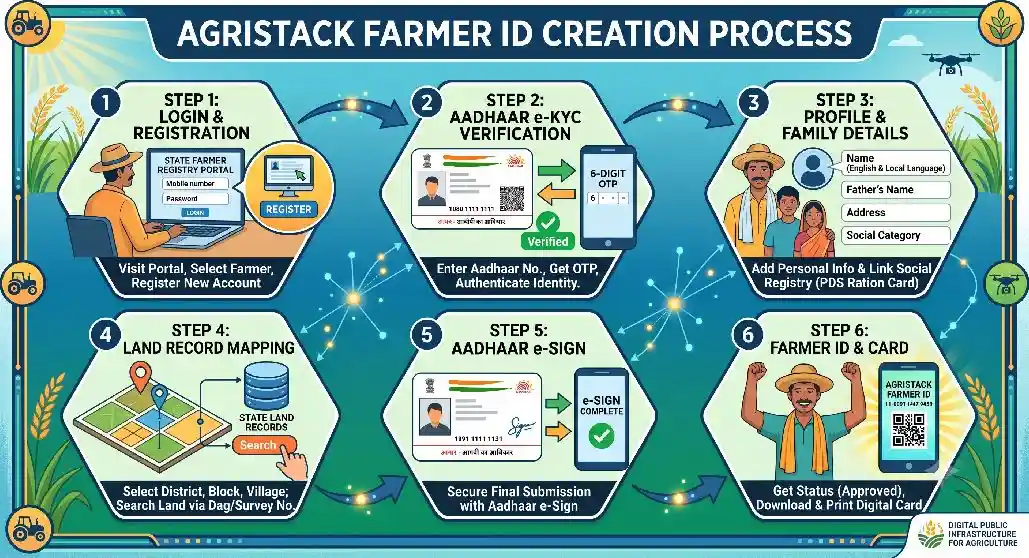
Follow this verified, portal-tested sequence to register your profile, verify land plots, complete Aadhaar e-Sign, and generate your Farmer ID:
Step 1: Portal Access and AgriStack Farmer ID Account Creation
- Navigate to the official State Farmer Registry Portal (e.g., West Bengal Farmer Registry Portal) or the central AgriStack registration link.
- On the main landing page, under the Login As dropdown, select “Farmer”.
- If you are a new applicant, click on “Create New Account”.
- Enter your 12-digit Aadhaar Number, accept the terms and consent checkbox, and click Submit.
- You will receive a 6-digit OTP on the mobile number linked to your Aadhaar. Enter the OTP and click Verify.
- Once the Aadhaar e-KYC completes successfully, your name, father’s name, gender, date of birth, and official address will populate on your screen.
Step 2: Mobile Authentication and Password Setup
- Scroll down to enter your operational Mobile Number and click to send OTP.
- Enter the mobile OTP and click Verify.
- Create a strong Password of your choice and re-enter it to confirm.
- Click on “Create My Account”. Your user credentials are now successfully generated.
Step 3: Farmer Dashboard Login & Profile Details
- Return to the portal login screen, select “Farmer”, enter your registered mobile number, password, and the on-screen captcha, then click Login.
- An additional security OTP will be sent to your mobile. Enter it to open your personal farmer dashboard.
- Click on the button labeled “Register as Farmer”.
- You will be prompted if you wish to change your mobile number; select “No”.
- Entering an email ID is optional.
- Local Language Translation: Your name and father’s name will appear in English. You must enter your name and father’s name in your Local Language (e.g., Bengali) in the corresponding fields.
- Select your social category (General, OBC, SC, ST) and enter your full residential address in both English and Bengali, selecting your District, Sub-District, Village/Gram Panchayat, and Pincode.
Step 4: Fetching and Verifying Land Details (Dag / Survey Number)
- Under Land Ownership Details, select the farmer type as “Owner” (if the land is self-owned/ancestral).
- Click on the button labeled “Fetch Land Details”.
- Choose your State, District, Sub-District/Block, and Village/Mouza where your agricultural parcel is located.
- In the Survey Number field, enter your Dag Number (Plot Number) and click Search.
- The system will display the official land ownership roster for that plot fetched from the state land database.
- Select your name from the owner list. Your associated plot holdings and acreages will appear on screen.
- Check all your respective plot checkboxes and click Submit.
- Click on “Verify All Land”. The portal will process the land records and display the total confirmed land holding area.
Step 5: Social Registry & PDS Ration Card Integration
- Scroll down to the Social Registry Details section.
- Select “PDS Ration Card” as your family database option.
- Enter your active Digital Ration Card Number and provide your Family Member ID.
- Click on the Update button. An OTP will be triggered to your mobile number.
- Enter the OTP and click Verify to validate your family card record.
- Check the declaration confirmation box and click Save.
Step 6: Aadhaar e-Sign Verification Process For AgriStack Farmer ID
- Once your profile data is saved, click on the button labeled “Proceed to e-Sign”.
- The page will redirect to the secure national Aadhaar e-Sign gateway.
- Enter your 12-digit Aadhaar Number, select the Aadhaar OTP verification mode, and click Get OTP.
- Enter the one-time passcode received on your Aadhaar-registered mobile and hit Submit.
- Upon successful biometric authentication, your application is formally sealed and submitted.
Step 7: Downloading Application PDF & Tracking Status
- After e-Sign completion, your screen will display your unique Family Enrollment ID Number.
- Click on “Download PDF” to save and print your detailed application acknowledgment for your personal files.
- To monitor your file, click on “Check Enrollment Status”. Initially, the status will show “Pending”.
- Revenue and Agriculture field inspectors (such as the local Revenue Inspector, Patwari, or Assistant Agriculture Officer) verify the land records online.
- Within 7 to 10 working days, your status will turn to “Approved”, and your unique Farmer ID Number will be issued. You can then download and laminate your official digital Farmer ID Card directly from the dashboard.
District Rollout Status
In West Bengal, the Farmer Registry portal rollout is taking place in systematic phases. Initially, registration opened in selected districts including Hooghly, Howrah, Nadia, Alipurduar, Jhargram, and South 24 Parganas, before expanding statewide. Farmers in these operational districts can register immediately online, while remaining regions are progressively activated on the portal.
Exploring Other Government Welfare Schemes for Rural Households
While the AgriStack Farmer ID streamlines farm credit, insurance, and crop benefits, rural families should also explore complementary central and state welfare initiatives to safeguard their household finances, small business ventures, and energy security:
- Artisan & Craft Support: If your household engages in traditional trades, smithing, or artisanal work alongside farming, explore specialized financial toolkits and credit through the PM Vishwakarma Yojana Online Apply.
- Youth Empowerment & Self-Employment: If young members of your household are looking to establish micro-enterprises, commercial agribusiness units, or food processing setups, financial credit is accessible via the Bhabishyat Credit Card Scheme Online Apply. In addition, explore state career and skill-building platforms through the Banglar Yuvashakti Scheme Online Apply.
- Food & Nutritional Security: To ensure uninterrupted food grain assistance and subsidized nutrition for rural families, keep your entitlements updated with the Annapurna Yojana Online Apply.
- Slashing Household Energy Costs: Irrigation pumps and household electricity costs can take up a large part of farm income. By shifting to solar energy under the PM Surya Ghar Muft Bijli Yojana, farmers can set up rooftop solar panels, eliminate hefty power bills, and even sell surplus energy back to the grid.
Troubleshooting Common AgriStack Farmer ID Registration Errors
| Problem | Root Cause | Solution |
| No Land Records Found on Search | Digitization delay or mismatch in Dag/Plot number entry. | Re-verify your Dag/Survey number with your latest physical Parcha. Contact your local BL&LRO office if recent mutations haven’t synced online. |
| Aadhaar e-Sign OTP Failure | UIDAI server congestion or outdated mobile linkage. | Try completing e-Sign during non-peak hours, or update your active phone number at an Aadhaar Seva Kendra. |
| Name Spelling Mismatch | Bengali spelling does not match land revenue records. | Type your name in Bengali precisely as recorded in the ancestral or mutated land ledger (Khatian). |
| Enrollment Status Showing Pending | Officer verification pending in your block/sub-district. | The standard verification timeframe is 7 to 10 working days. If it exceeds 15 days, visit your local Block Agriculture Office (ADA/AAO). |
Frequently Asked Questions (FAQs)
1. Is there any application fee for generating an AgriStack Farmer ID?
No. The registration and Farmer ID card download process on the official government portal is 100% free of cost. Authorized Common Service Centers (CSCs) charge only a nominal nominal administrative fee if you utilize their computer and scanning services.
2. What should I do if I hold land in more than one village?
During Step 4 (Fetch Land Details), after adding the first Dag number, you can repeat the search process for different villages or sub-districts and add all your owned plots before clicking “Verify All Land”.
3. Can I complete registration if my mobile number is not linked to Aadhaar?
No. An Aadhaar-linked mobile number is mandatory because both initial account creation e-KYC and final Aadhaar e-Sign require OTP verification sent directly by UIDAI.
4. How will I know when my Farmer ID card is ready to download?
You can log into the portal anytime using your registered mobile number and password, then click on “Check Enrollment Status”. Once approved, your unique Farmer ID number will be visible, alongside a Download Farmer Card button.
Conclusion
The AgriStack Farmer ID is transforming Indian agriculture into a transparent, secure, and digitally empowered ecosystem. By integrating your Aadhaar identity, land plot records, and family registry into a single unified profile, you eliminate red tape and gain guaranteed access to government welfare, subsidized inputs, and institutional credit.
If your district is active on the Farmer Registry portal, follow the step-by-step guide outlined above, verify your Dag numbers, complete your Aadhaar e-Sign, and secure your digital Farmer Card today.