Online Insert PDF Pages Tool
Insert single or multiple pages into an existing PDF document instantly. Supports batch inserting multiple files at any targeted location with 100% in-browser privacy.
Batch Support
Multi-File InsertionExact Location
Target Page Splicing100% Private
Pure Client-Side1. Primary Source PDF
Click or Drag & Drop main document2. PDF(s) to Insert
Select one or multiple PDF files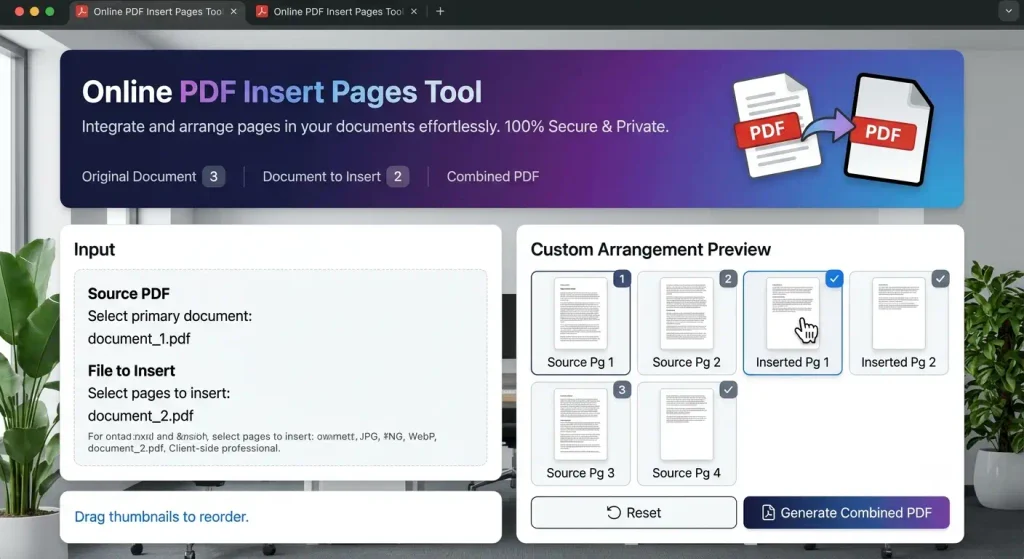
An online document integration tool built to Insert Pages is a vital office productivity utility designed to interleave supplemental reports, add missing addendums, and splice cover sheets into existing digital files. Choosing an automated browser platform to Insert Pages eliminates the hassle of purchasing expensive document editing software subscriptions. Operating entirely within modern web browsers, this client-side utility provides instant dual-color thumbnail rendering so you can preview merged page structures before downloading your finalized document.
Table of Contents
- 1. Why You Need to Insert Pages into Professional PDF Records
- 2. How Object Tree Splicing Interleaves Separate PDF Documents
- 3. Pure Client-Side Security: Guaranteeing Complete Document Confidentiality
- 4. Precise Numerical Positioning: Placing Sheets at Any Document Location
- 5. Dual-Color Thumbnail Previews: Preventing Costly Assembly Mistakes
- 6. Step-by-Step Instructions to Insert Pages Online
- 7. Frequently Asked Questions (FAQs)
- 8. Related Webmaster, SEO & Document Management Utilities
1. Why You Need to Insert Pages into Professional PDF Records
When preparing corporate agreements, academic binders, or audited accounting statements, critical amendments, disclaimers, or signature slips often arrive late. Having the capability to Insert Pages directly into your files avoids the cumbersome step of re-exporting entire publication layouts from scratch. In accordance with digital accessibility best practices highlighted on Google Search Central, providing cohesive, logically ordered records prevents informational fragmentation and improves reader comprehension.
Whether prepending a newly branded title page to an annual corporate summary or slipping notarized receipts into tax records, deciding to Insert Pages ensures all supplemental information merges into a single file without formatting discrepancies.
2. How Object Tree Splicing Interleaves Separate PDF Documents
A Portable Document Format file is organized as a complex hierarchical object graph comprising cross-reference dictionaries, content streams, typography assets, and page arrays. When you prompt the tool to Insert Pages, the internal parser executes delicate byte-level operations:
- Cross-Document Leaf Extraction: The parser indexes the secondary document’s page array, extracting content streams, media boxes, and rotation parameters.
- Shared Font and Asset Transfer: Embedded typography subsets, vector paths, and high-resolution raster layers are re-mapped into the target document’s resource catalogs.
- Array Splicing at Target Indices: The newly transferred leaf references are inserted into the primary page array at the designated insertion coordinate.
- Binary Serialization: The finalized catalog structure compiles and serializes into a clean PDF byte stream ready for immediate local saving.
3. Pure Client-Side Security: Guaranteeing Complete Document Confidentiality
Many legacy web conversion portals transmit sensitive records to external cloud servers, exposing private trade records, personal identification cards, and financial receipts to third-party vulnerabilities. Our platform operates exclusively on a zero-knowledge in-browser architecture.
When you import records to Insert Pages, binary byte buffers are maintained strictly within local device memory via JavaScript typed arrays (Uint8Array). Zero network packets are sent across external clouds, ensuring that corporate secrets and personal legal paperwork remain completely private on your computer or smartphone.
4. Precise Numerical Positioning: Placing Sheets at Any Document Location
Standard document combining tools often force new sheets to append strictly at the very end of a file, requiring users to open separate reordering programs afterward. Our platform provides pinpoint insertion control directly within the main workflow.
Users can choose to add sheets at the beginning (index 0), in the middle between specific chapters, or at the end of the file. This flexibility to Insert Pages anywhere within the document hierarchy saves time and eliminates tedious post-merge adjustments.
5. Dual-Color Thumbnail Previews: Preventing Costly Assembly Mistakes
Combining documents blind without visual feedback often leads to misplaced sheets and confusion. Our interface prevents this by generating crisp canvas thumbnail previews for every page across both uploaded documents.
Primary source pages are highlighted with blue border indicators, while newly integrated sheets feature distinct purple accents. This visual contrast makes it easy to review the assembled document before you confirm and Insert Pages into your final PDF deliverable.
6. Step-by-Step Instructions to Insert Pages Online
Integrating sheets into any PDF document using our free browser tool involves four straightforward steps:
- Upload Source Document: Click the first dropzone to load your main document.
- Upload Insertion File: Click the second dropzone to upload the pages you want to insert.
- Set Insertion Point: Use the position selector to define the page number after which the new sheets will be placed.
- Download Merged File: Click “Insert & Download Merged PDF” to compile and save your expanded document instantly.
7. Frequently Asked Questions (FAQs)
Can I insert multiple pages at once from a second PDF?
Yes. If your secondary document contains multiple pages, our tool will insert the entire sequence into your primary document at the selected position.
Is it possible to Insert Pages into an encrypted PDF?
If your file is secured with an active password, you must remove the password protection first before you can Insert Pages with our web editor.
Will combining documents degrade font clarity or vector paths?
No. The underlying parser copies content streams and vector outlines losslessly without re-encoding or downsampling graphics.
Are my documents stored on any server when I Insert Pages?
No. All processing runs locally inside your browser sandbox. Once you close or reload the browser tab, all cached file memory is permanently purged.
Pingback: PDF to ZIP: Free Online PDF Archive Compressor (2026)